Week 1: Introducing me
Who am I? Who is Miss W or tasteach?


Whenever you meet someone for the first time, it is a good idea to introduce yourself. Maybe mention some interests or family. Well here is the introduction I give to my online blogging students. You will notice I haven’t mentioned where I live or the school I work for; I haven’t included any birthdates or phone numbers. I have tried not to include any really personal information.
Now it is your turn to introduce yourself to me and your readers. Some of you might need to update the information from a previous about me page.
- What are you going to include?
- What are you going to leave out?
- Does your school have any rules about what you can include on your blog like photos and maps?
Check out these students’ introductions.
- Have they been careful in what they have included?
- Should some of them change some information on their page?
- Notice they are written in a variety of styles – how are you going to write yours?
- What different web tools have they used in their introductions? Check out some of the web tools links on the sidebar of this blog.
Mackenzie Grade 4, Jacob grade 4, Annabel grade 4, Caitlin grade 4, Tatyana aged 17 writing in English from Russia, Olivia blogging for 2 years, Em only 8 years old but 4th year of blogging challenge, Isabella the bookworm, Jake one of our student mentors
Where do I write my introduction?
Edublogs or wordpress blogs have a sample page. Click on sample page and edit by deleting what is there and adding your information. Make sure you change the permalink as well. Otherwise follow these directions.
If you don’t have pages on your blog eg kidblog users, then you will need to write a post instead. Maybe you can add a widget on the sidebar of your blog and include text in there.
If using Blogger/blogspot, check out how to add a page to your blog here .
Creating your about me page in steps for Edublogs users
- Login to your blog.
- Go to Pages > All Pages
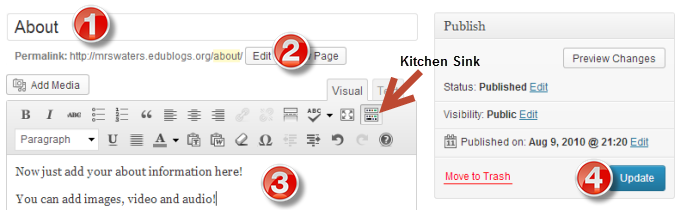
- Hover your mouse over the Sample Page title and click Edit.
- Change the title to About Me or something similar.
- Remember to also edit the permalink to About then OK.
- If you only have one row of icons above the box, click on the last icon called the kitchen sink. This opens a second row which allows you to change font colours and to insert from a word document.
- In the box, write a bit about yourself remembering to be internet safe. Make sure you have checked out the pages from other students mentioned – many of them have been blogging for a while.
- When you have finished click the big blue button on the right side of your screen – probably says Update.
Refer to detailed step by step instructions in the Edublogs User Manual on writing your About page for more help!
Please check: Some themes do not have the pages visible in the header area.
This means you need to go to Appearance> Widgets in your dashboard and drag the pages widget across to your sidebar area if you are using an Edublogs theme.
Classes and their about pages
Some classes have a few different about pages – one for their teacher, one for the class and one for the school.
Check out these class blogs and what they have included: Mrs Donofrio explains blog title, Mrs Amri also has a text box widget about the blog, Mrs Hankinson’s class wrote poems in the comments to introduce themselves, Mr Woolley’s class created Vokis and embedded them on a page, these 3rd graders dream big, this 5/6 class created a video, this class from Ireland are great at leaving comments on student blogs around the world, Rebecca’s class has a great welcome post, this class from Serbia includes a movie about their school
To find out more about pages for your class blog, check out this section of the teacher challenge.
Still got more time left this week??
- Start visiting other blogs in the student and class list above the flag header of the challenge blog.
- How many different countries have students or classes participating?
- Create another page on your blog like a guest profile – ask visitors questions for them to answer in the comments.
Finally, when you have finished your page(s) come back to this post and leave a comment. Mention the URL of your blog and why you think I should include your page as a great example in the next challenge in September.
124 comments on “Week 1: Introducing me”
This is my Blog
http://icecream102.edublogs.org/2014/06/03/introduction/
-Haneen
http://wolfbladeraven.edublogs.org/2014/05/27/jannah-poem/
Bilal H.
Jannah Poem
http://shaboffside.edublogs.org
my blog
-Shaaban
Hey! This is my blog for Abdullah!
http://monky13.edublogs.org/2014/05/27/jannah/
http://wolfbladeraven.edublogs.org/wp-admin/post.php?post=3&action=edit
Bilal H. Intro blog
http://bediwala.edublogs.org/2014/06/01/poem-about-jannah/
here is my peom about jannah
-amina
Hello
Here is mt blog:http://fajitasx.edublogs.org/
-Ahyan B.
http://magnesiumsmg.edublogs.org/2014/05/20/about/
-Mohamed Gaballah
Hello,
Here is my blog: http://rayyanlatif.edublogs.org/
The link to the poem’s at the bottom.
-Rayyan L.
http://bediwala.edublogs.org/2014/05/28/about-me/
-Amina Jaffer
This is my blog
iyoussef9.edublogs.org
go to the “About” tab for the introduction, and the “Jannah Poem” Tab for the Jannah poem
-Islam Youssef
G’day Islam,
For some reason I am getting a word press message saying you have deleted this blog. So sorry, but I couldn’t leave a comment.
My awesome blog
http://rasheedmossallam.edublogs.org/2014/05/27//
-Rasheed Mossallam
Hi, this is my introduction blog:
http://mrnodusman123.edublogs.org/2014/05/27/intro-to-me/
Thanks for reading!
-Omar
This is my blog
http://fandomsforever.edublogs.org/wp-admin/post.php?post=13&action=edit#
-Aalaa
This is my blog…
http://kawaiipotato123.edublogs.org/
Safa H
http://thelist102.edublogs.org/2014/05/27/jannah/
-bayan
http://yaztan.edublogs.org/
– Yazan Tanbour
http://naheelskoolblog.edublogs.org/
– Naheel Ahmed
this is my blog
http://uchihas101.edublogs.org/
-Aisha
Hi!
Here is my blog! It’s Awesome!
http://theleemar.edublogs.org/
-Rameel
Here is my blog:
http://theamazinlist102.edublogs.org/2014/05/27/the-intro-to-me/
Here is my poem:
http://theamazinlist102.edublogs.org/2014/05/27/jannah-poem/
-Fatima
This is my blog
http://habeelo2.edublogs.org
-Osama H.
G’day Osama,
Sorry I left two comments for you but one I hadn’t used your name in the greeting.
This is my blog
http://bookfandoms.edublogs.org/about/
-Nuha
Dear Miss.W,
I would like you to check out my blog my blog about my digital footprint.
http://myblogdaniela12.edublogs.org/2014/03/28/my-digital-footprint/#respond
Thank you!
Your blogging buddy,
Daniela
Sorry I’m late for putting this comment on. I have been very busy. I think you should check out my blog because I can relate to a lot of kids and I am friendly to all my visitors. Here is the link- http://rachelsmwps2014.global2.vic.edu.au/
Hope you can check it out!
Heya, My name is Elias and my blog is Whynotadventures.edublogs.org I am beginning to participate in the student blogging challenge. Im very proud of my blog as it is and I feel that I post regularly enough. It would be totally cool if I was featured in the next challenge next September but I’m sure theres lots of blogs to choose from. have a nice day!
Hello my name is Dan. I have a mom, dad,sister, and dog. I play baseball and basketball. I really like baseball and hope to play college ball. My sister is a swimmer.
Hi Mrs. W,
I noticed that I was featured in the Flipboard Magazine but the link you provide to my blog doesn’t work because like you suggested, I had my teacher re-approve my blog so I could change the title.
Here is the correct link
http://audriannaam.edublogs.org/2014/03/13/about-me/
Thank you for featuring me,
Audrianna
Here is the URL to my blog http://taylor8sms.edublogs.org/. I hope you find it fun and interesting! Please let me know what you think.
-Taylor
Mrs. W,
My class learned about attributions. Here is our blog post about what we learned about:
http://blogs.goaj.org/bbarrett/2014/04/02/attribution/
I hope that you enjoy!
Mrs. Barrett
Hi Ms. W,
My blog url is http://castor8sms.edublogs.org/. I thought I should let you know that I’m happy to be participating in this Student Blogging Challenge. I hope you find my blog interesting, and let me know what you think!
Sincerely,
Castor
Hello again,
Since we wrote our introductions about us back in week 1 we have received so many questions about sports in Ireland. In particular what is the G.A.A., hurling, Gaelic football and camogie. We decided to write three blog posts in response to these questions.
If you would like to learn more about sports in Ireland click on the links below!
http://firstclassroom12.weebly.com/1/post/2014/03/gaelic-football.html
http://firstclassroom12.weebly.com/1/post/2014/03/hurling.html
http://firstclassroom12.weebly.com/1/post/2014/03/camogi.html
If you have any other questions please post them as a comment! Thank you.
Ms. Glynn and Room 12
Hi! I was wondering how do I register in this challenge or if I still can. My teacher just told me about this great challenge and I was really looking forward to entering since this is my first year of blogging.
http://writingfrommyheart.edublogs.org
G’day Alice,
Thanks for looking at the challenge. Your blog looks like it is coming along nicely with some great posts. To register for the challenge, fill in the form here http://studentchallenge.edublogs.org/2014/02/22/student-registration/ then start connecting with students in your age group by clicking on the Student list above the flags on the challenge blog. Every Sunday (Australian time) a new challenge will be posted. Lots of activities to choose from – do one each week or do them all if you want.
http://kidblog.org/MorgadosClass2013/900d71b9-f6a3-466f-a731-313cca455251/all-about-us-global-blogging-challenge-welcome-week-1/
h
We are so excited to be participating in the challenge again. Check out our updates to our About Us page (and the reason behind our blog name “Bloggin’ Frogs).
http://mrsmckelvey.edublogs.org/about/
Hi Miss W,
I finished my “About me” writing challenge, and I think I used many descriptive words, while keeping the writing interesting and worth reading. I’m very happy to be participating in this blogging challenge and hope you hvae time to include or just check out my blog! Here is a link to my blog.
http://audriannaam.edublogs.org/
Miss W,
We had a great time video taping and creating a video introduction in Animoto!
http://5thgrademagnet.edublogs.org/about-us/
Hello from Connecticut!
I am posting on behalf of the BHS Tech Team. They have an About Me page which details the purpose of the group as well as the Tech Team page with their bios.
http://bhsihelp.wordpress.com/
I think you should include mine because I include
Lots of things about me!
Here is the link
http://matildasmoments.blogspot.ae/p/all-about-me.html
Hello Miss W.,
Our students used a combination of applications to put together an introduction: Haiku Deck, Sound Cloud, and ThingLink all come together in one Smore to give visitors an introduction to our school in Texas and to our classes.
http://wrmstkriese.edublogs.org/about-us/
Hello miss.w I would like it if you checked on my blog because I put lots of time in it . Check out my blog here
http://share.sis.org.cn/21ck02/2014/03/14/about-me/