Week 4: A picture is worth
Yes, this week we deal with using images, music and sounds in your posts.
But can’t I use any image, music or sound that is on the internet?
No, you must use creative commons or in some cases the fair use rule.
But where can I find these images, music and sounds?
Head to the creative commons website. Check out the CC wiki to find out what is happening in your country. What are the different licenses used? Teachers check out the education section of creative commons. Youtube allows creative commons for videos. Teachers: A fantastic guide to copyright, fair use and creative commons has been written by Ronnie Burt and I would suggest you read this to understand more about using images, music and video on your blogs. Larry Ferlazzo also has a great “Best List for images” that you might want to check out as well. Mrs Yollis did an activity with her students about creative commons.
OK I want to use some legal creative commons images and music in my slideshow. Where can I go to get them?
Do you have compfight plugin for your blogging platform? Click on this link from previous challenge to find out how to activate it in Edublogs and how to use the normal compfight website.
Other places to get images and music:
You will need to work out how to get the attribution to put on your posts.
Images
- Morguefile – a great post explaining how to use including attribution
- Open ClipArt
- Flickrcc – Here is a post I have written about using flickrcc
- Pics4learning – A post I have written about using this website.
Music and sound effects
Jamendo, CCMixter, post with 14 websites for music, post with 20+ websites for music, post with 55+ sites with sound effects
Now for the activities for this week
Activity 1 Watch this video about sharing work and write a post about what you learned.
Activity 2. Check out this story using remix and fair use of video. Leave a comment below after watching the video. What was interesting, positive or negative about it?
Activity 3. Find an image or piece of music. Add it to your post and write a poem relating to the image or music. Invite your readers to write their own poems. PS April is Poetry Month. Thanks to Mrs Hutchison for this idea.
Activity 4. Similar to activity 3. Find an interesting landscape image. Write the beginning of a story relating to your image. Remember to include a conflict of some sort between your characters. Invite your readers to finish the story. How many different endings can you get? Which ending do you prefer?
Activity 5. Write a sentence using just images – no words.
Activity 6. Find 5 images that create a story – again no words.
Activity 7. Create a slideshow, photo gallery or poster about your interests to add to your about me page or as a separate post.
Activity 8 – Create your own images and add to a post of your choice
Other options for creating your own images include:
- Image Generators such as ImageGenerator.org
- Comic Generators like MakeBeliefsComix.com, kerpoof, ToonDoo
- Photo Editors like Befunky, fd’s Flickr Tools
- Tag Cloud Creators such as Wordle
- Graph Creators including GraphJam and Crappy Graphs
Mixing up your images using these types of tools can really spice up your posts! Leave a comment on this post, if you or your class can recommend some other image sites to add to this list.
Activity 9– Zoom out from an image
We first tried this activity in the challenge in September 2010. Choose a picture, and have your readers zoom out, so to speak, by leaving comments. Check out the example from Huzzah who finished their story. If doing this activity, include the word ‘zoom’ in your title so I can find it easily. Remember to give attribution. Most important here is to read previous comments, so you can add to the story.
Check out these zoom pictures: Becky, Jacqueline, Abbey
Activity 10 – Go back to previous posts
If you have used images in any previous posts you have written, then you are ethically obliged to go back to the post and give the correct attribution or take the image out of the post if it does not have the right creative commons license.
Activity 11 – Create a jigsaw from your image. Check out how Mrs Schmidt’s students did this for a previous activity. Here is a post from Mrs Schmidt with a tutorial on how to create the jigsaw images.
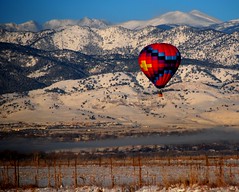 Activity 12– Tell the story of the picture
From Bill Ferreirae – I sometime find a picture and tell students to use that picture to come up with a story. It can be about the picture, what happened before, what will happen next, etc. So, here is the image I have chosen for you to start with. Copy the image to your post, then write the story. Remember to give attribution. If you don’t have your own blog, tell your story in a comment here.
 Photo Credit: Let Ideas Compete via Compfight
Still got time left this week:
Visit other student and class blogs
Start using tags and categories with each post you write to make it easier for people to find posts on certain topics. Make sure you have the tags and categories widgets in your sidebar.
Have at least five other student blogs linked on your sidebar – students from other classes and schools- not your own. We will need this for a game we play in a couple of weeks.
Try to have a few different headings like
- My Friends
- Class Blogs
- Overseas Blogs
Having lots of links to student blogs from other countries will help spread the game.
Here are the instructions for adding links to your sidebars.
Edublogs, Blogger, Kidblog – not sure if this widget goes on the class page or each student page
Most important thing to take away from this week’s challenge is:
Use creative commons images, not just any image on the net. Always include attribution of where you found the image. Compfight plugin does this for you.
78 comments on “Week 4: A picture is worth”
I Did Activity #5!
http://kpsabbeyk.global2.vic.edu.au/?p=21
The use of the Walt Disney film clips certainly caught my attention and that made me watch it over again to listen more carefully to what the characters were saying.
Week 4
Activity 1
Dear Miss W.
I found the video extremely interesting, being an avid disney fan. I liked how they would add transition clips in between. At first, I thought that the video was illegal, until they got to the part about fair use. Now I understand the laws and how they need to be followed. 🙂
Thanks,
Vivi
Dear Miss W.
I learned that it is very important to check the copyright on something before you upload or post it. I think that this is a very valuable lesson and I will use creative commons more often.
With My Regards,
epi12
Hello Miss W.
My children and I spent a couple of weeks on this challenge. Learning about all the different CC licenses, what can be used, how to use other’s work and give proper attribution can all be quite confusing 😕 , but it is very important to us to do everything right, so we are learning all we can and doing our best.
➡ Check out Ghost’s activity 4 post: The Dragon War, and if you click on his home page, you will see his activity 3 and 6 posts as well. I thought he did a good job, especially since he has not been that excited about doing a blog.
Here is a link to the Creative Commons post I added to our class blog.
Also, thank you for the wonderfult activity ideas! 😀 They were a great source of inspiration.
Activity 2: I enjoyed this video however I don’t think the way they presented it was very strong. It was a good idea and I’m sure that the people who made it worked very hard, but, the overall video lacked thoughtfulness.
HI Everyone!
I added activity 4, 5, and 9 to my blog. Please check it out! It’s AWESOME!!!!! 😎
Here is a link to activity 4, finish the story: Locksigold and Her Sisters
Kat 😎
I thought this week’s challenge was great! Come check out my story starter at: http://mikayla0873.edublogs.org/2014/04/08/the-end-of-existence/
I thought that this video could have been very informational but due to the switching Disney scenes it was very hard to understand. I thought that this was a very cool idea but it wasn’t executed very well.
This video was fairly interesting because of all the different disney scenes. It was a little hard to understand because of all the parts that they had to incorperate.
I learned what many of the different copy rights were called. 🙂
Miss. W.
I really enjoyed this blogging challenge and would have to say that this challenge, “A picture is worth…” was one of my favorites so far. For this post, I made it a little more personal, so I hope you can check my blog out.
http://audriannaam.edublogs.org/2014/04/05/enjoy-the-moment/
Thank You,
Audrianna
Second Video (Activity #2):
This video is very creative and interesting. What is positive about the video is that it teaches and helps us understand copyright using Disney movies. Using Disney is positive because it can be familiar to many people, so it is more amusing to learn about copyright while watching a cartoon that you know. The only negative point about the video is that it is sometimes hard to understand what the characters are saying, because either the video was going too fast, or the words themselves were hard to understand. Overall, the video was a creative way to learn about copyright.
I think that I already posted a response to this, but I can’t seem to find it…
Activity 1) The first video was very interesting and displayed a very helpful message. It was never boring and the design was creative and helped to better the whole message of the video. I learned a lot and will be sure to be aware of this in publishing works on my own blog.
Activity 2) I believe that the video had a very good message, but was hard to understand and comprehend. I think that there is a much better way to display the information without the video being confusing and still appealing to a younger audience.
– Quinn
I found the video very creative. The way the director but the different movie clips together really made me focus more on what I was listening to. On the downside the video was quite confusing because of the different clips. I would have added subtitles to the video this way it would have been easier to understand.
I think that this video was difficult to understand, but had a very good point and underlying meaning. I think that if there had also been subtitles, this video would have made more sense. While this video get the point out in an entertaining way, it still was not exactly viewer friendly because it was difficult to understand. If the creator’s goal was to just prove the point, a more visual video would have helped.
One thing that I thought was negative about it was that it was really hard to follow, and it was pretty repetitive. I don’t know about others, but for me, it went way too fast. This is negative because I couldn’t really understand the message that the video was trying to get across to me. I thought that the video was really redundant. Also I got really distracted trying to figure out which movies the snippets were from.
I found ti interesting that they used a company notorious for copyright restrictions and used clips from their videos to explain copyright and fair use. However, the video seemed to be a bit biased. I think it may come from the perspective of a person (or people) who do not create and distribute much work online. They claim that “it is not fair” for copyright to last so long. An author of a famous or important piece of art may disagree with that statement. Overall, though, the video was quite clear and explained the two issues well.
I liked how they used really disney characters. I don’t think I really resinated with the video that well. The video did a poor job of instilling their message.
I thought this video was definitely funny how the Disney characters talked and perhaps a little distracting. I think that the movie should have been more serious because copy-writing something that is common.
I thought the video was interesting. I thought it was very ironic how the video was made using clips from various Disney movies. However it was hard to understand. I got very confused and it just made my head hurt. But I did learn new things, such as fair use policies, so it must have been a good video.
We’ve been getting some great responses to our You Finish our story which is called “An unexpected prairie treasure…”. We’re from Kansas and the picture shows how beautiful our state can be.
http://lmsblogs.org/newspaper/2014/04/01/an-unexpected-prairie-treasure/
You can find our story starter there.
We LOVED this challenge this week! Here are some of my students’ blog posts including pictures!
Charlie:
http://blogs.csdvt.org/digilaurentcharlie/poem-for-blogging-choose-ending/
Ava:
http://blogs.csdvt.org/digilaurentava/2014/04/04/a-girl-in-wonderland/
Jared:
http://blogs.csdvt.org/digilaurentjared/2014/04/04/finish-my-story/
Sophia:
http://blogs.csdvt.org/digilaurentsophia/2014/04/04/bloging-challege-week-4/
Please read their posts and write a new ending!!
I found the video a bit confusing. While I think it was an interesting idea to use different clips from different Disney movies, it didn’t really drive the point home. It must’ve taken someone a very long time to do this video, and I applaud them for their effort. However, it was choppy and there was a lot of movement which made it wobbly. The video did make a good point about copyright from what I could understand.
Hi Everyone,
I thought the second video was generally quite good. The sound quality and the editing wasn’t very good so I couldn’t understand some minor things. But generally it covered all of the basics to copyright law and was pretty cool.
Sincerely,
Felix
http://share.sis.org.cn/21yw01
PS I have done all of the challenges for this week.
My students had a lot of fun doing Activity 4 this week. Here’s a link if you’d like to write the endings to their stories.
http://kidblog.org/SISClassof2019/tag/blogging-challenge-week-4/
Mrs. Schmidt
I thought this video was very interesting. I like how they used Disney’s movie scenes to create this video in a unique way to display that copyright is against the law. At times, it can be a little annoying and hard to understand, but other than that it is a great video.
Hello Everyone,
Could some one please come and visit my blog?
http://anastasiao.global2.vic.edu.au/
While your there could you please leave a comment and leave a link to your blog, because i will be sure to visit yours 🙂
Anastasia